Capture the part that mattered.
Select an exact passage from any webpage and save it without breaking your reading flow.
A MINOR WORKS UTILITY FOR CHROME
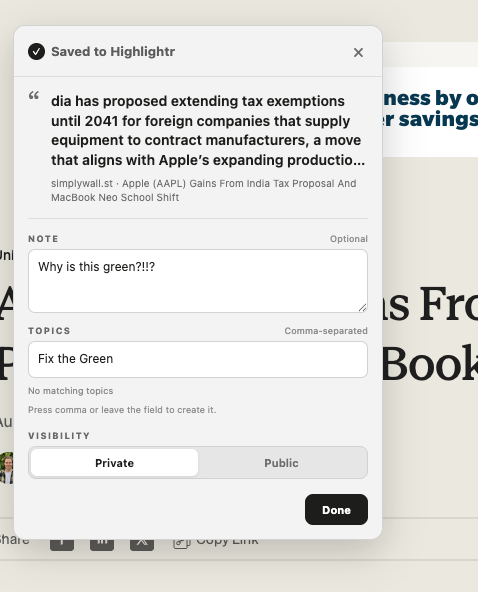
Save the exact passage that mattered, keep it connected to its source, and add a note or topics while the thought is still fresh.
Be the first to know when Highlightr is ready for the Chrome Web Store.
You’re on the list. We’ll email you when it’s live.
No account required. Your captures stay private in your browser.
SAVE MORE THAN THE PAGE
Bookmarks remember where something was. Highlightr remembers the part you wanted—and why you wanted to keep it.
Select an exact passage from any webpage and save it without breaking your reading flow.
Add a note and one or more topics while the reason for saving it is still clear.
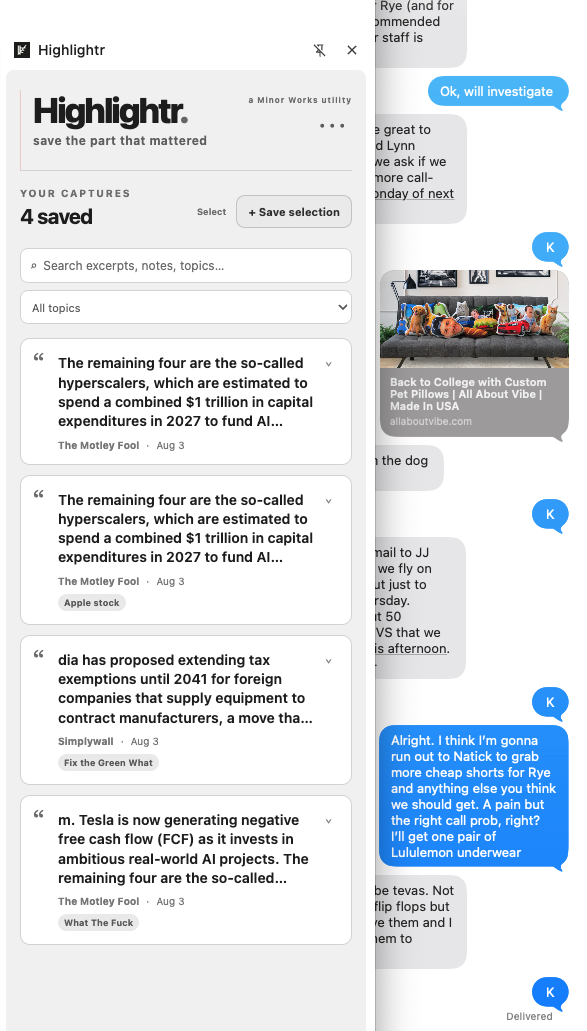
Search your captures, filter by topic, and copy selected excerpts with their publications, sources and URLs.
YOUR READING, REMEMBERED
Highlightr turns scattered passages into a small, searchable record of what has caught your attention—reporting, arguments, quotations and ideas worth returning to.
Highlightr.
Every capture keeps the excerpt, publication, source URL, note and topics together.
DESIGNED TO GROW WITH YOUR READING
Highlightr begins as a private, local utility. It is also being designed for an optional connected future: an account you control, access across devices, richer context around what you have read, and better ways to follow the subjects and sources that matter to you.
Those connected features are not part of the current browser-only release. Local use will remain useful on its own.
Optional accounts and syncing could make the same private collection available across computers and devices.
Related articles, repeated subjects and earlier excerpts could help a saved passage become part of a larger thread.
Choose topics, publications or people to revisit over time—without turning your private reading into a public feed.
YOU ARE WHAT YOU READ
Bookmarks remember where something was. Highlightr remembers the part you wanted—and why you wanted to keep it. A bookmark points at a whole page; a capture keeps the exact passage, plus your note, searchable later.
Your captures live in your browser, not on a server. Export them as a JSON file any time—before uninstalling, switching computers, or just as a backup—and you’ll have everything: excerpts, sources, notes and topics, in one file you control.
No. Highlightr works with no sign-up and no account today. It’s being built so an optional account—for syncing across devices and following what matters—can be added later without changing how it works now.
LOCAL FIRST
Highlightr currently stores captures in your browser. Nothing is published or shared, and Highlightr does not build a record of pages you merely visit.
You can export your complete collection whenever you want. Questions or problems? Visit Minor Works.